
 Upgrade Storage
After update to Zotero 9, colors of pdfs are inverted irregularly?
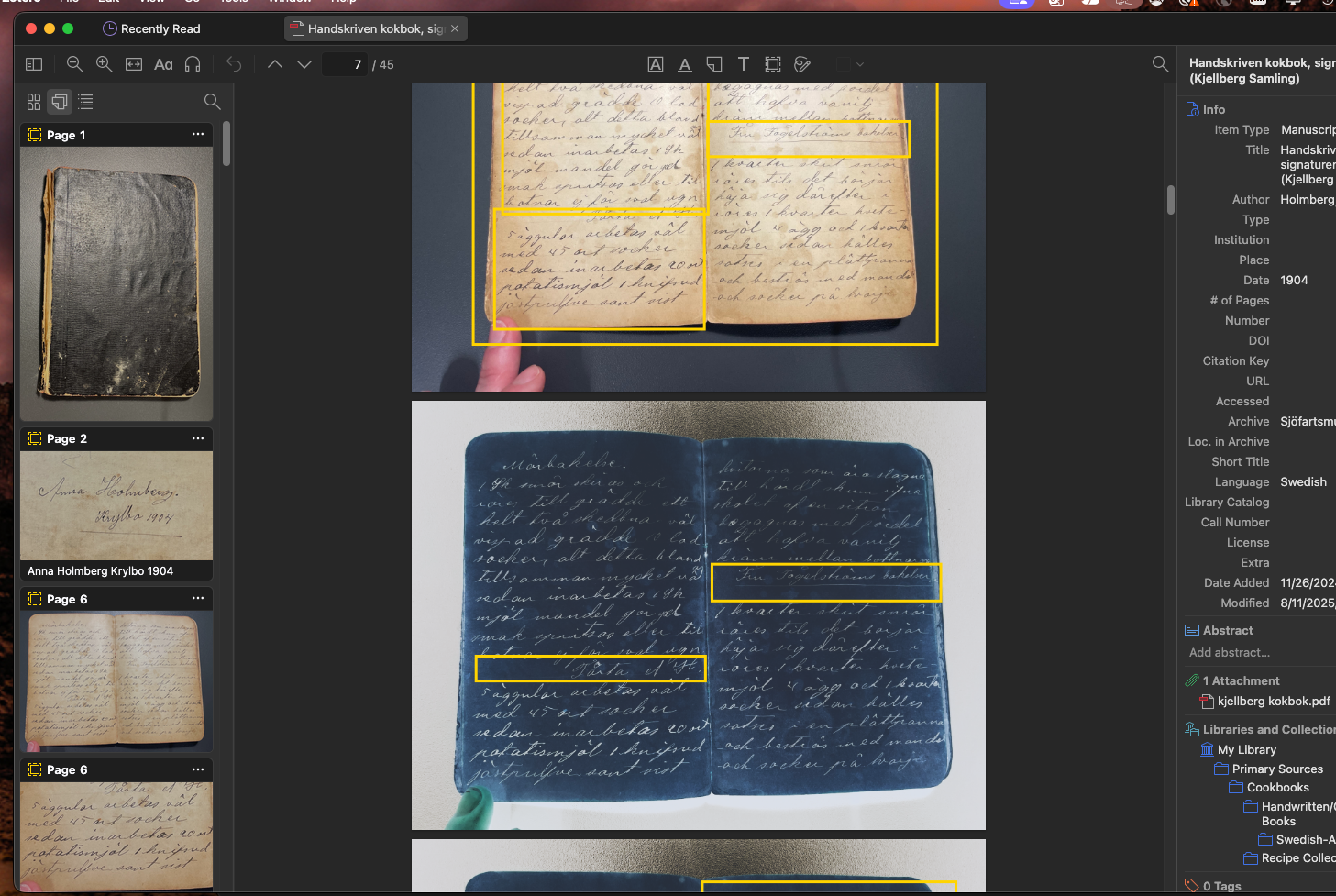
I recently updated Zotero and have a bunch of issues with the color of my pdfs. Many of them, though not all and not all of them completely, seem to have the colors inverted. This is fine for the materials that are all text based, but I have a number of scans of manuscripts that are now pretty much illegible and many of the pages are half inverted, half not. The original files, when viewed in acrobat, do not have this issue. I restarted the computer and Zotero but am still having this issue. Newly imported PDFs also have the same problem.
Photo example: Has both original color and inverted color.
https://s3.amazonaws.com/zotero.org/images/forums/u6043184/xhouqtc5mc59ws49a4zy.png
Does anyone have any suggestions on how to fix this? Any one have the same issue?
Thanks.
Photo example: Has both original color and inverted color.
https://s3.amazonaws.com/zotero.org/images/forums/u6043184/xhouqtc5mc59ws49a4zy.png
Does anyone have any suggestions on how to fix this? Any one have the same issue?
Thanks.
The Light theme is equivalent to turning off the "Use Dark Mode for Content" setting in earlier versions, which you might have done.